Weather Trader — gopfan2-style temp bets via NOAA Copytrading — follow top wallets automatically Signal Sniper — trade on RSS feeds
The cool thing? With the Simmer SDK, you can build your own strategies in

Basically Spartan Labs is creating modular trading “skills” (automated trading modules) for the OpenClaw AI agents that enable Polymarket trading through natural language commands.
Using their
«skills base» and Simmer SDK
, which allows users to build custom trading strategies through conversational chat without coding, you can’t create you trading assistant right in you TG, Discord or even Slack chats.
How its works ?
The “skills” are Python-based modules that integrate with Polymarket’s Polygon contracts and CLOB (Central Limit Order Book) API.
Users can execute trades through natural language prompts “Buy $50 YES on market X” or “Find me hedging opportunities,” and the AI agent handles the execution automatically.
What skills are coming to Polymarket trading?
As of now, they’ve already announced 6 skills that are coming:

- Weather trading:
Trade weather markets using NOAA forecast data. Automatically monitors temperature predictions and executes trades when forecasts match market buckets.
Inspired by
$2M+ weather trading strategy

How it works:
- Fetches NOAA forecast data for configured locations
- Matches predictions to market buckets (e.g., “34-35°F”)
- Calculates confidence based on forecast certainty
- Executes trades when confidence exceeds threshold
- Copytrading
Monitors wallets from your configured whale list or top traders. Larger positions from tracked wallets create stronger signal weight.
Follow wallets with 60%+ win rates from

How it works:
- Monitors configured whale wallet addresses
- Aggregates positions with size-weighted scoring
- Filters for high-conviction positions
- Mirrors positions with configurable max size
- Signal Sniper
Trade on breaking news from RSS feeds with built-in risk controls. Works with any RSS feed - news sites, Twitter-to-RSS, newsletters.
Catch news before markets react with Claude-powered analysis

- Polls configured RSS feeds for new articles
- Matches headlines against your keywords
- Checks market liquidity and current positions
- Executes trade or alerts you based on config
- Trade Journal
Auto-log every trade with entry thesis, market conditions, and outcomes. Monthly calibration reports identify mistakes and improve your edge.

More details coming soon…
- Arbitrage Scanner
Scans correlated markets for mispricings. When YES+YES on mutually exclusive outcomes < $1.00, profit is guaranteed.

More details coming soon…
- X Sentiment

More details coming soon…
That sounds really big in my opinion and I’m sure it’s just a small part of what’s coming.
How to start your own Clawbot using Simmer SDK ?
The second question I asked myself, when I got an answer to what I had found, was “how can I start my own Clawdbot for Polymarket trading?”
And we’ll break this point down into 4 sub-points:
- Installing Clawdbot on your device
- Connecting it to ChatGPT 5.2 and a Telegram bot
- Installing Simmer SDK
- Funding your wallet on Simmer and launching the bot
Thanks to Simmer founder Adrian, who helped me a lot with all the troubles along the way and answered all my questions until I was done.
Step 1: Install Clawdbot on your Mac/PC
First of all, I recommend you explore OpenClaw’s official documentation to understand all the risks involved in installing it on your devices.
The installation procedure isn’t hard, but you need to do it correctly for your bot to work well and avoid getting a ton of troubles like I had.
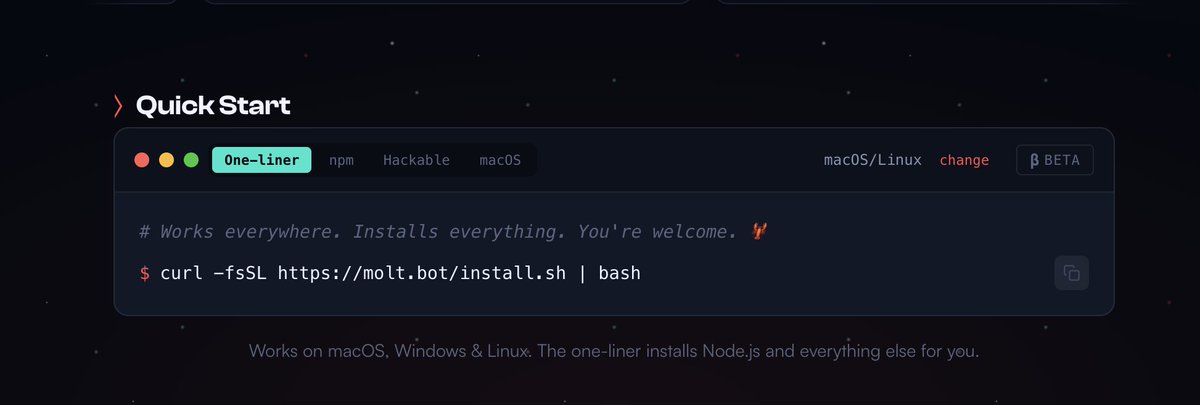
Go to the official MoltBot site ( clawd . bot ) and find the one-liner installation code
bash
curl -fsSL https://molt.bot/install.sh |bash
Open your “terminal” (I’m using Mac for installation) and paste it there. Give it 2-3 minutes to be done.

Start Clawdbot “Onboarding guide”.

If you haven’t seen a “code” as in the picture below, run the onboarding guide command.
bash
openclaw onboard
- Next, choose the options I’m about to list:
- I understand this is powerful and inherently risky:
YES
- Onboarding mode:
QUICK START
- Model/auth provider:
OpenAI ( Codex Auth + API Key )
- OpenAI aut method:
ChatGPT OAuth
Then it will ask you to connect your ChatGPT account, which MoltBot will use to analyze information.

I bought ChatGPT Plus ($20 per month) for my Clawdbot. You may connect any other provider from the list that you want or are already using. It doesn’t matter.

- Connect the Telegram bot to communicate with Moltbot:
- Select Telegram bot API
- Go to
in Telegram and send /newbot
- Then create a name for your bot and a
that ends with “bot”

Then enter this token to your terminal.
- After this, send a message to your Telegram bot and it will send you back your bot ID and your pairing code. Send them to the terminal too.

- Complete the Clawdbot installation by selecting the same options as I did.

Step 2: Set up Simmer Agent
Now lets start with setting up Simmer agent.
- First, go to ( simmer . markets ) and connect your EVM wallet.
- Press the wallet button in the right corner and deposit USDCe (Polygon), POL, and USDC (Base) to your platform account.

- Then go to the Agent tab at the top → choose OpenClaw on the left → Overview tab and click “manual” Installation.

- Copy the “code-message” and send it to your MoltBot in Telegram, terminal, or using localhost
bash
Read https://simmer.markets/skill.md and follow the instructions to join Simmer
- I sent this command to the Telegram bot, and Clawdbot sent me a link for Agent registration back → Enter the link and connect your bot with your wallet.”
- If you don’t get a link, try sending this message: “Follow the Simmer skill Quick Start - register and send me the claim link


3. Install “skill” for your Moltbot
Go to the skill section at Simmer Market and choose the skill for your bot to use for trading. For example, I will trade weather markets.
- Copy the command from the skill section and send it to your MoltBot chat.

- Once it’s installed, your MoltBot is ready for trading on Polymarket.

- Now you can talk to him as to your personal assistant and it will use pre-trained strategies to find opportunities and trade on Polymarket.

Conclusion:
In my opinion
and Simmer Markets are opening a big market of pre-trained models for Clawdbot assistants which will help you trade on Polymarket and search for new opportunities.
Quer publicar seu artigo?
·